How do I dispute an ACH transaction on my checking account?
If someone has transferred money from your account without your authorization or if your statement shows transfers that you did not make, please notify us as soon as you can. We must hear from you no later than 60 days after we send you the first statement on which the transaction(s) appeared.
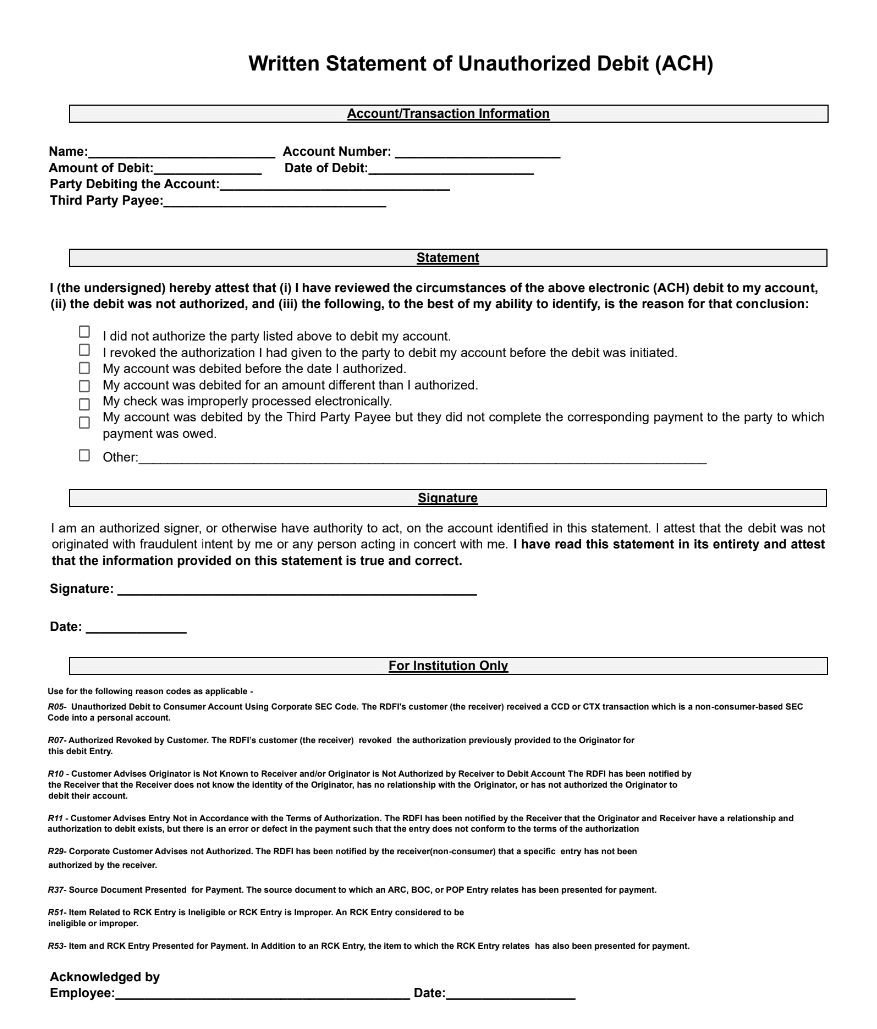
To ensure a timely and proper investigation of your claim, please complete and sign a Written Statement of Unauthorized Debit (WSUD) form (see form below) for each transaction you would like to dispute, and email the form(s) to us at depositsupport@upgrade.com.
The form(s) must be completed in its entirety and all information must be clearly legible.
In your email, please describe the transaction(s) and explain in detail why you believe it was authorized.
If you would like to submit your ACH dispute over the phone, you may contact our team directly by calling (844) 551-2442. We are available Monday - Friday 5AM - 7PM PT, Saturday & Sunday 6AM - 5PM PT. You are still required to complete and sign the WSUD form for us to investigate your claim.
Please note, an ACH transaction is an Electronic Funds Transfer (EFT). EFTs debit funds from your bank account directly without the use of a debit card. If you see a charge on your debit card you did not authorize, please give us a call at (844) 551-2442.
Articles in this section
- ACH Return Fee & Inactivity Fee
- Are there any fees associated with receiving a new debit card?
- Can I add a beneficiary to my checking/savings account?
- Can I open a joint checking/savings account?
- How can I initiate an outgoing wire transfer from my deposit account?
- How can I make a deposit to my checking or savings account?
- How can I wire funds into my checking or savings account?
- How do I change the PIN for my Upgrade Visa® Debit Card?
- How do I dispute an ACH transaction on my checking account?
- How do I set up my new debit card?